

iOS 27 brings major app-level changes to Camera, Photos, Wallet, and Shortcuts — moving Visual Intelligence front and center and adding AI tools that actually change how you use your phone day to day. According to Bloomberg's Mark Gurman, Apple is also treating iOS 27 as a "Snow Leopard" release focused on underlying performance and battery life gains alongside the new features. This isn't just a Siri rebrand — it's a meaningful rethink of what the Camera app is for.
- Apple is renaming Visual Intelligence as "Siri mode" inside the Camera app in iOS 27, making it a top-level mode alongside Photo, Video, Portrait, and Panorama.
- The Camera app gets a fully customizable widget-based control system, with shortcuts for flash, exposure, timer, depth of field, and resolution arranged in user-chosen order.
- The Wallet app will add a "Create a Pass" feature that digitizes physical tickets and membership cards by scanning a QR code or creating a custom pass manually.
- Shortcuts in iOS 27 will support natural-language shortcut creation — describe what you want, Siri builds and installs it automatically.
- Apple is also adding AI-powered bill splitting to Apple Cash: take a photo of a receipt and generate payment requests for each person at the table.
- Visual Intelligence in iOS 26 requires holding Camera Control or assigning it to the Action button — most users don't know it exists.
- iOS 27 Siri mode in Camera will add two new Visual Intelligence capabilities: nutrition label scanning (calories + macros to Health app) and business card contact scanning.
- Camera app controls are being redesigned as "widgets" organized into categories — basic, manual, and settings — selectable from a transparent tray.
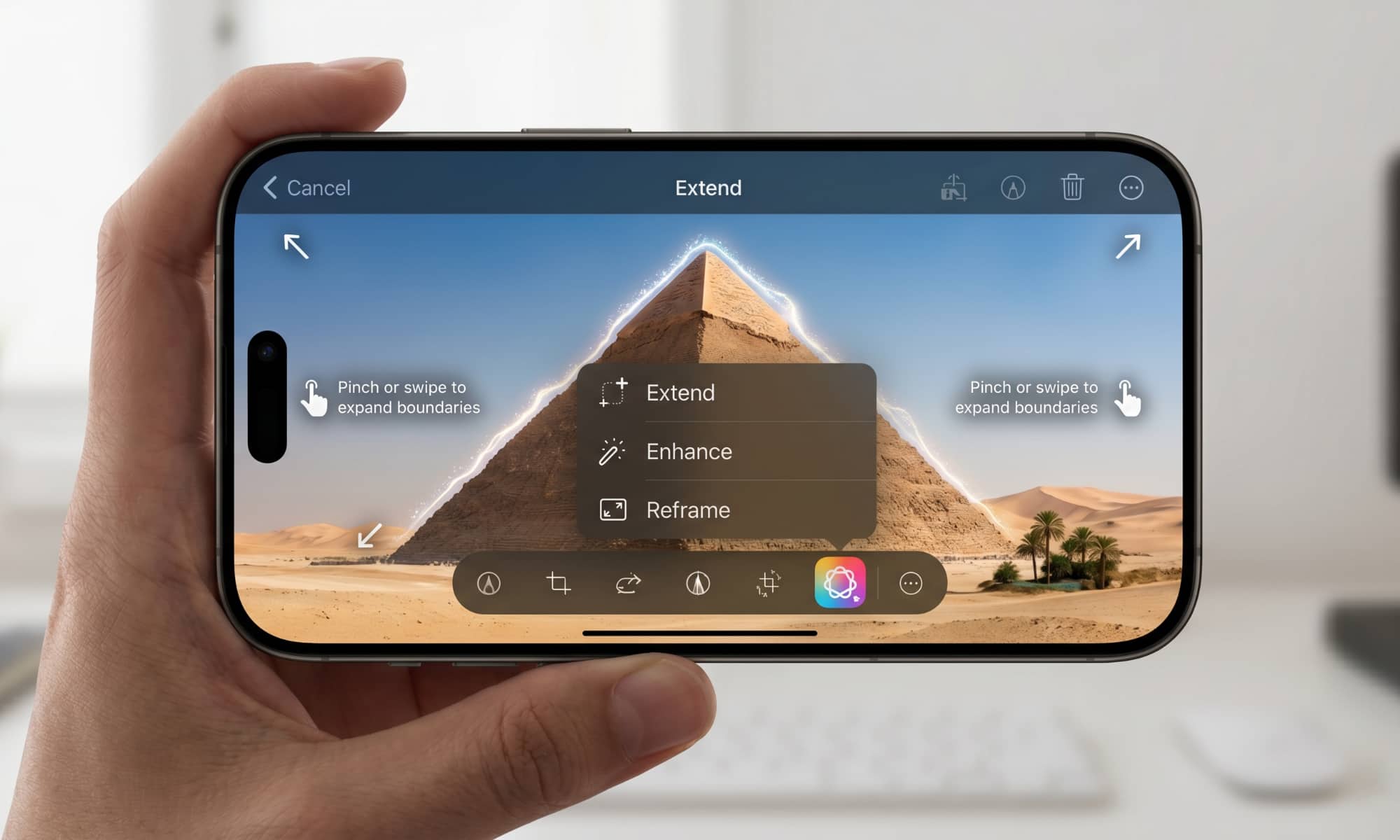
- The Photos app will get two new AI editing tools: Extend (fills in scenery beyond the original frame) and Reframe (changes perspective on spatial photos after capture).
- Wallet's Create a Pass feature uses three color-coded pass types: purple for events, blue for memberships, and orange for other passes.
- Apple is testing a natural-language photo editing feature for the Photos app; it may not ship in the first iOS 27 release.
- iOS 27 will preview at WWDC 2026 on June 8, with a public beta expected in July and full release alongside new iPhones in September 2026.
iOS 27 Camera App: Visual Intelligence Finally Gets a Proper Home
The Camera app's biggest change in iOS 27 is structural — Visual Intelligence is no longer buried behind a hardware button. Apple is adding a dedicated "Siri mode" that sits at the top level of the Camera app, right alongside Photo, Video, Portrait, and Panorama.
In Siri mode, the shutter button shows the Apple Intelligence logo instead of the standard camera icon. Point at anything — a plant, a product, a restaurant menu, a face — and Siri will identify it and pull information from the web. According to Bloomberg, Apple is also adding two new Visual Intelligence capabilities in iOS 27: scanning nutrition labels to log calories and macros directly to the Health app, and scanning business cards to save contact information automatically.
This is the right call. Visual Intelligence in iOS 26 was genuinely useful — it just had a discovery problem. Hiding it behind a long-press on Camera Control meant most people never found it. Making it a named mode changes that completely.
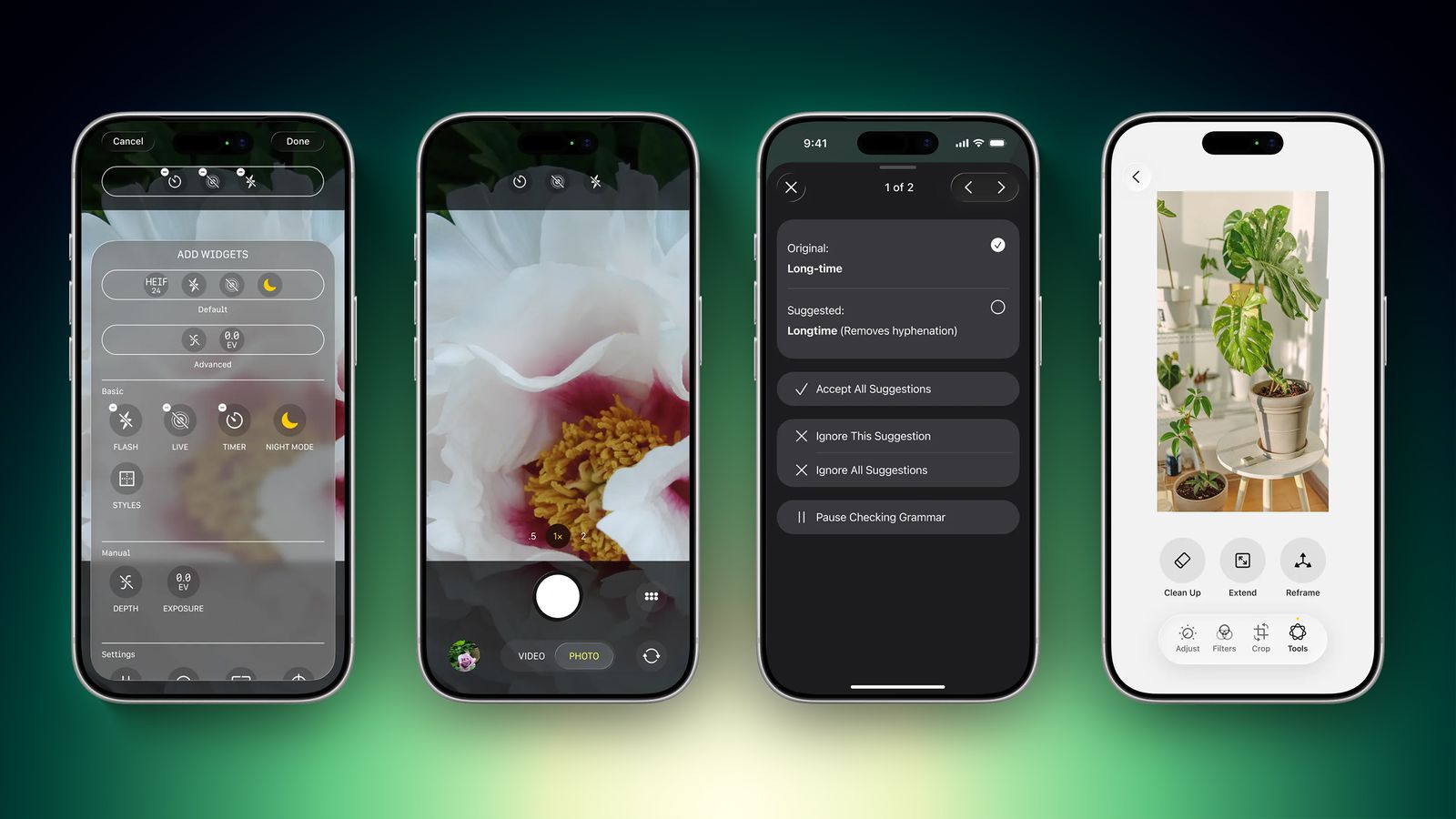
iOS 27 Camera Controls: A Customizable Widget System for Power Users
The Camera app is also getting a complete redesign of its controls interface. Apple is replacing the fixed top-row shortcuts with a widget system — users can choose which controls appear and in what order.
Available widgets include flash, exposure, timer, depth of field, photo styles, and resolution. A transparent tray slides up from the bottom of the app and organizes them into three categories: basic, manual, and settings. The default layout stays the same for casual users, but power users — and anyone shooting in manual — will find this genuinely useful.
| Camera Feature | iOS 26 | iOS 27 |
|---|---|---|
| Visual Intelligence access | Camera Control long-press / Action button | Dedicated "Siri mode" in Camera |
| Top-row controls | Fixed: Flash, Live Photo, Night Mode | Customizable widget tray (user-ordered) |
| Control categories | Single panel (top-right icon) | Basic / Manual / Settings tabs |
| Grid & level options | Existing options only | New grid and level variants added |
| Controls panel location | Top-right corner icon | Right of shutter button |
iOS 27 Photos App: AI Editing Gets Extend, Reframe, and Natural Language
The Photos app in iOS 27 adds an "Apple Intelligence Tools" section inside the editing view, with two headline features: Extend and Reframe.
Extend is essentially generative fill for the edges of a photo — it generates plausible scenery beyond the original frame, useful for recropping or changing the composition after the fact. Reframe is for spatial photos specifically, letting you change the perspective of an image after it's already been captured. Both are genuinely new capabilities, not repackaged filters.
Apple is also testing a natural-language editing mode where you describe the changes you want — "make the sky bluer," "crop to portrait," "brighten the shadows" — and the app applies them without manual sliders. That feature may not ship in the initial iOS 27 release, but the fact that it's in testing suggests it's not far off.
iOS 27 Wallet: Create a Pass and AI Bill Splitting
The Wallet app is getting two additions that address things it should have handled years ago. The first is "Create a Pass" — a feature that lets you digitize physical tickets, membership cards, and event passes by scanning a QR code or building a custom pass from scratch.
Apple is using a color-coded system: purple for events, blue for memberships, orange for everything else. You can customize images, colors, style, and text. If there's no QR code to scan, the manual creation option covers it. This is a direct answer to the long-standing annoyance of physical loyalty cards and paper tickets that have no digital counterpart.
The second addition is AI bill splitting inside Apple Cash. Take a photo of a receipt, and iOS 27 will generate Apple Cash payment requests for each person at the table. That's one of those features that sounds minor until you've actually been the person manually dividing a twelve-person dinner check.
iOS 27 Shortcuts: Build Automations With Plain English
Shortcuts in iOS 27 will support natural-language shortcut creation. Open the app, describe what you want a multi-step shortcut to do, and Siri builds it and installs it automatically — no dragging and dropping actions, no figuring out which parameters to chain together.
The Shortcuts app will open with a prompt field asking "What do you want your shortcut to do?" This is the right UX. The current Shortcuts app is powerful but intimidating — most people who would benefit from it never build anything because the learning curve is too steep. Natural-language creation removes that barrier entirely.

Frequently Asked Questions
The Camera app changes are the headline here, and they're long overdue. Visual Intelligence has been one of the genuinely impressive things Apple Intelligence can do — and it's been invisible to most users because of how it was surfaced. Making it a named mode with its own UI position is how you actually get adoption. The Wallet pass creation and bill splitting are the kind of practical quality-of-life fixes that make people reach for their iPhone instead of another app. And natural-language Shortcuts creation could finally make the app useful for the 90% of people who've opened it once and never went back. iOS 27 is shaping up to be the update where Apple Intelligence stops being a feature list and starts being something people actually use.
Enjoy this article? Follow us on Google to see more content like this.
 Add as a preferred source on Google
Comments
Post a Comment