

iOS 27 turns CarPlay into a genuinely conversational, video-capable dashboard, with a smarter Siri, scrubbable media playback, and EV-aware navigation. According to Apple's iOS 27 preview, the update brings Apple Intelligence-powered Siri, parked-car video streaming, and deeper third-party app integrations to the dashboard. Most CarPlay updates are incremental — this one actually changes what you do in the car, not just how it looks.
- Siri on CarPlay now uses Apple Intelligence to hold conversational, context-aware exchanges, with a glowing orb replacing the old waveform animation.
- A new video app category lets apps like Netflix and Prime Video play on the CarPlay screen, but only while the vehicle is parked.
- Apple Music and Podcasts get a mini-player with scrubbing support, and developers can add the same mini-player to their own apps.
- EV navigation apps can now talk directly to the car's systems to suggest charging stops based on remaining range.
- CarPlay ships 12 new wallpapers and a "Parked Car" Apple Watch Smart Stack widget for finding your vehicle.
- Siri's CarPlay conversation history syncs across Mac, iPhone, and iPad through a dedicated Siri app.
- Video playback automatically falls back to audio-only the moment the car starts moving.
- The "talking" voice-assistant interface, previously limited to chat apps, is now open to every CarPlay app category.
- New stack and list views support rich thumbnails, text, and real-time sports scores for developers.
- A dedicated wireless icon and an updated battery icon appear in CarPlay settings, reflecting iOS 27's system-wide visual refresh.
- Apple says wireless CarPlay connections are more reliable in iOS 27, citing improved connection protocols.
- 12 new themed wallpapers have been added to the CarPlay settings menu.
Siri AI on CarPlay: How Apple Intelligence Changes the Driving Experience
Siri on CarPlay gets noticeably more conversational once Apple Intelligence is running on a compatible iPhone. Instead of single-shot commands, you can hold a back-and-forth exchange — ask a follow-up question without repeating context, and Siri tracks the thread.
Visually, the change is obvious the moment you trigger it: a glowing glass orb now appears at the bottom of the screen whenever Siri is listening or responding, replacing the flat waveform bar from previous CarPlay versions. It's a small touch, but it makes the assistant feel present rather than just functional.
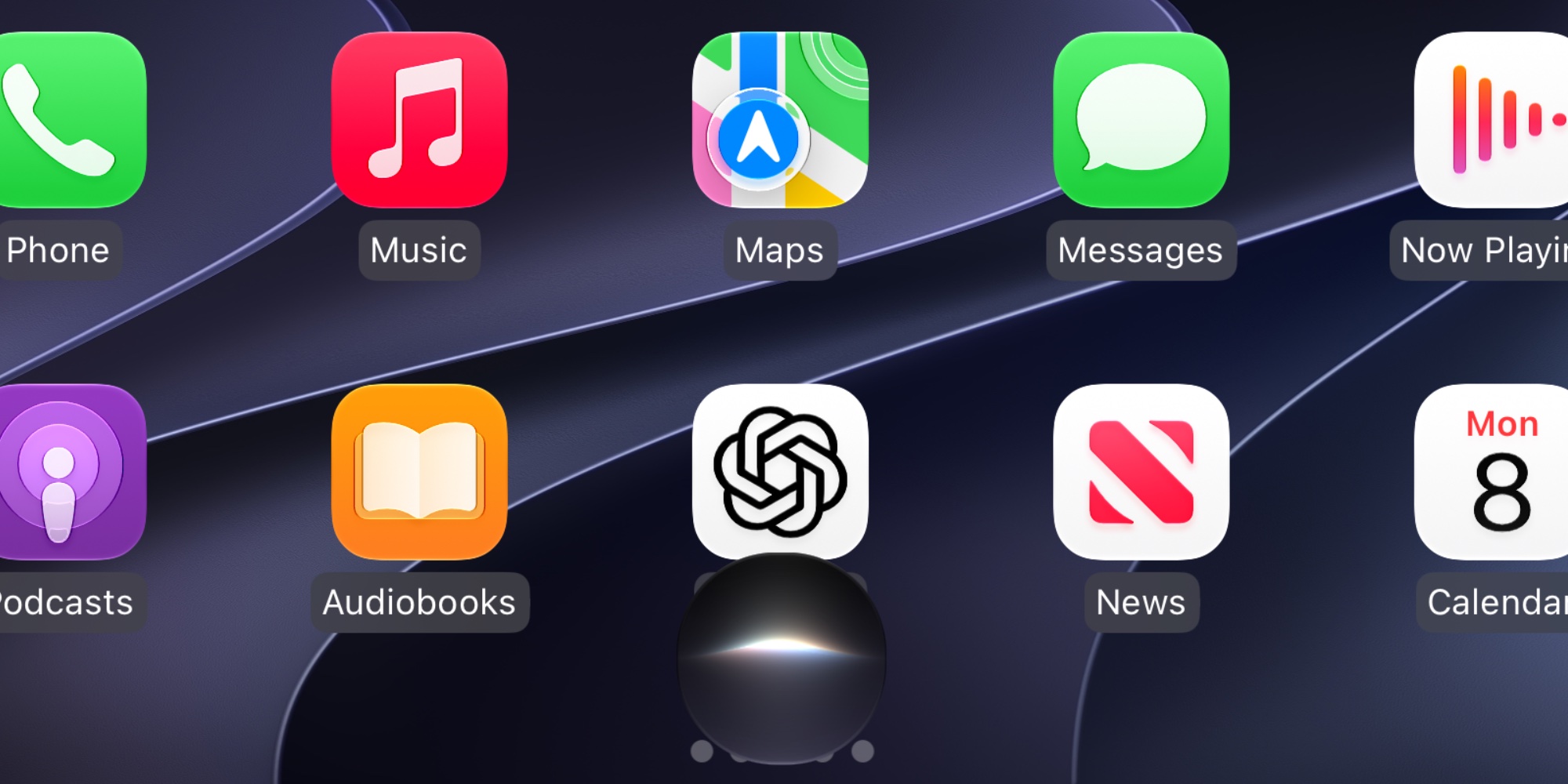
Apple has also built a dedicated Siri app for CarPlay, so past conversations stay visible inside the car instead of vanishing the moment you park. That history syncs across Mac, iPhone, and iPad, so a question you asked Siri on your commute is still there when you open Siri on your laptop that evening.
CarPlay Video Apps: Why Netflix and Hulu Only Work When Parked
iOS 27 introduces a new CarPlay app category built specifically for video streaming, covering services like Netflix, Hulu, and Prime Video. According to MacRumors, Apple first previewed AirPlay-based video streaming to CarPlay back at WWDC 2025, and iOS 27 is where that promise actually ships, alongside native video-browsing support for developers.
The catch — and it's a sensible one — is that this only works in Park. The moment the vehicle starts moving, CarPlay automatically drops the video and falls back to an audio-only stream of whatever was playing, so the screen never becomes a distraction while driving.
| Feature | Driving | Parked |
|---|---|---|
| Video playback | Audio-only fallback | Full video on screen |
| Video app browsing | Limited | Full library access |
| Siri AI conversation | Available | Available |
Mini-Player and Scrubbing: What's New for Apple Music and Podcasts
CarPlay's media interface gets two practical upgrades in iOS 27. A mini-player now sits in the top-right corner for Apple Music and Podcasts, letting you keep browsing your library while playback continues underneath — no more losing your place every time you want to queue something new.
You can also scrub manually through a track or podcast episode by dragging the indicator on the playback bar, instead of relying on skip-forward and skip-back taps to estimate position. Third-party developers can implement the same mini-player pattern in their own apps, so this isn't limited to Apple's built-in media apps.
EV Route Sharing: How CarPlay Talks to Your Car's Navigation System
Electric vehicle owners get a feature that's been missing for years: two-way communication between navigation apps and the car itself. The vehicle's system can now factor in your EV's remaining range and suggest charging stops automatically, updating the route inside the navigation app in real time.
It's a small architectural shift with a big practical payoff — your dashboard's range estimate and your phone's map finally agree with each other, instead of running as two disconnected systems you have to mentally reconcile on a long drive.
New Wallpapers, UI Indicators, and the Parked Car Watch Widget
iOS 27 ships 12 new themed wallpapers in the CarPlay settings menu, alongside two new system indicators: a dedicated wireless icon that appears when connected via wireless CarPlay, and an updated battery icon matching iOS 27's broader visual refresh.
Apple also says wireless CarPlay connections are more reliable in this release, attributing the improvement to updated wireless connection protocols aimed at reducing lag. For developers, CarPlay gains new stack and list views supporting rich thumbnails, text, and real-time sports scores — building blocks for richer third-party apps.
Outside the car, Apple added a "Parked Car" widget to the Apple Watch Smart Stack, so finding your way back to where you left the vehicle no longer means opening Maps and squinting at a pin.
Frequently Asked Questions
The video-apps headline is the easy clickbait angle, but the EV route sharing is the feature that actually changes daily driving. Letting the car's own range data talk to navigation apps in real time fixes a problem Tesla owners have had solved for years while everyone else juggled two separate range estimates that never matched.
Enjoy this article? Follow us on Google to see more content like this.
 Add as a preferred source on Google
Comments
Post a Comment