

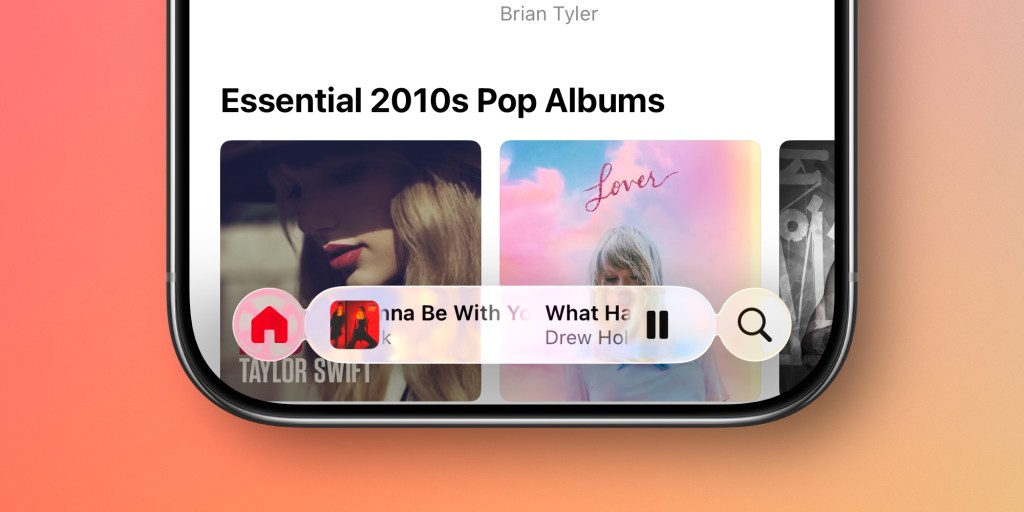
Apple is correcting iOS 27's most-criticized design failure: the collapsing Liquid Glass tab bar that forced users into extra taps to reach core navigation. According to Bloomberg's Mark Gurman, Apple is tweaking the tab bar in apps like Music, Podcasts, News, and Apple TV to combine the Search tab back into the main navigation row — making the bar persistent again. That's the correction iOS 26 badly needed, because no amount of translucent glass compensates for hiding the buttons people reach for dozens of times a day.
- Apple is reintegrating the Search tab into the main navigation bar in iOS 27 for apps including Music, Podcasts, News, and Apple TV, ending the standalone search button introduced in iOS 26.
- The iOS 27 keyboard will feature a new "sliding keys" animation where keys rise up from the bottom of the screen, replacing the abrupt pop-up behavior in current iOS versions.
- The Camera app is getting a fully customizable widget-based interface with controls organized into three categories: basic, manual, and settings — a first for Apple's native Camera app.
- Bloomberg's Mark Gurman reported on May 12, 2026 that these changes are designed to "streamline the Liquid Glass design language" rather than replace it.
- iOS 27 will be formally unveiled at WWDC 2026 on June 8, with a public release expected alongside the iPhone 18 series in September 2026.
- Bloomberg's Gurman report (May 12, 2026) is the primary source for all iOS 27 design change details in this article.
- In iOS 26, Apple split Search into a standalone button and made tab bars collapse to a single icon when users scroll — a change widely criticized for adding extra taps to core navigation.
- iOS 26.1 introduced a "Tinted" Liquid Glass option; iOS 26.4 added a toggle to fully disable Liquid Glass highlights system-wide.
- Apple's original iOS 26 design lead, Alan Dye, left the company to join Meta; Steve Lemay stepped in as the new design lead overseeing the iOS 27 corrections.
- The Camera widget categories in iOS 27 include controls for flash, exposure, timer, depth-of-field, photo styles, and resolution — each pinnable to the top of the interface in any order.
- Safari in iOS 27 is getting a redesigned Start Page with four tabs: Favorites, Bookmarks, Reading List, and History.
- Gurman previously noted that internally at Apple, the iOS 26 Liquid Glass issues were described as "a not-completely-baked implementation" rather than a flawed design direction.
iOS 26 Tab Bar Collapse: Why Apple's Navigation Broke
The tab bar problem in iOS 26 is straightforward to diagnose. Apple made tab bars fully transparent and programmed them to collapse into a single floating icon in the bottom-left corner whenever a user scrolls down.
It looked clean in keynote slides. In practice, it meant that switching from, say, the Library tab to the Search tab in Apple Music required two gestures instead of one — tap to restore the bar, then tap the destination. For an OS used by over 1 billion people, that is not a minor annoyance.
The design prioritized the appearance of space over the function of navigation. Every iOS design principle Apple has published for the last decade says the opposite should be true.
iOS 27 Tab Bar Fix: What Gurman's Report Actually Says
The fix is surgical, not cosmetic. According to MacRumors' report on Gurman's findings, Apple is combining the Search tab with the rest of an app's navigation tabs in the main bar — restoring the single-row layout that existed before iOS 26.
Confirmed apps include Music, Podcasts, News, and Apple TV. The strong implication from Gurman's language is that this is a system-wide policy change, not a per-app fix — meaning the collapsing behavior is being phased out entirely.
This is not a visual tweak. It is a reversal of a navigation paradigm. When Apple changes "how every app works" in a single note, that is a quiet admission that the original call was wrong.
iOS 27 Camera App: Widget-Based Controls Explained
The Camera update is the bigger story for power users. Apple is replacing the fixed control layout with a widget system — users will be able to select exactly which controls appear in the interface and in what order.
Widgets are split into three categories: Basic (flash, Live Photos, Night Mode), Manual (exposure, depth-of-field, photo styles), and Settings (resolution, timer, grid, level). Each widget can be pinned to the top row of the Camera interface independently for each shooting mode — Photo and Video have their own sets.
The default layout stays unchanged for casual users. The advanced mode is opt-in. That is exactly the right call — don't break what works for 90% of users while finally giving the other 10% what they've been asking for since iOS 14.
iOS 27 Keyboard Animation and Safari Changes Worth Knowing
The "sliding keys" keyboard animation — where keys rise from the bottom of the screen instead of appearing instantly — is a small detail with a clear purpose. It reinforces the depth model of Liquid Glass by suggesting the keyboard lives below the interface surface, not on top of it.
Safari is getting a redesigned Start Page with four clearly labeled tabs across the top: Favorites, Bookmarks, Reading List, and History. That is a better information architecture than the current blended view, which forces users to scroll past suggestions to find their own saved content.
Taken together, these are "S-year" changes — same design skin, fixed bones. As Gurman noted in his reporting, Apple expects "years of gradual improvements" with Liquid Glass, drawing a direct parallel to the multi-year refinement cycle that followed iOS 7's controversial flat design overhaul in 2013.
iOS 26 vs iOS 27: Liquid Glass Design Changes Compared
Here is where the two releases actually differ at the interface level:
| Feature | iOS 26 | iOS 27 |
|---|---|---|
| Tab Bar | Collapses to single icon on scroll | Persistent; always visible |
| Search | Standalone separate button | Reintegrated into the navigation bar |
| Keyboard | Standard instant pop-up | "Sliding keys" animation from below |
| Camera App | Fixed control layout | Fully customizable widget-based interface |
| Liquid Glass Tuning | Clear or Tinted presets (as of 26.1) | Refined shadows and opacity for readability |
| Safari Start Page | Mixed suggestions/saved content view | Four-tab layout: Favorites, Bookmarks, Reading List, History |
Worth adding context from our earlier coverage: Apple's push into iOS 26's Liquid Glass aesthetic happened in parallel with the company's broader hardware momentum. If you want the full picture of what Apple is building toward on the hardware side, our piece on iPhone 18 Pro's A20 chip and under-display Face ID connects the dots on where the platform is heading.
Frequently Asked Questions
Enjoy this article? Follow us on Google to see more content like this.
 Add as a preferred source on Google
Comments
Post a Comment