

OpenAI launched a personal finance feature for ChatGPT Pro on May 15, 2026, letting U.S. users connect their bank and investment accounts through Plaid. According to OpenAI's official announcement, the tool connects over 12,000 financial institutions — including Chase, Fidelity, Schwab, and Robinhood — and runs on GPT-5.5, which is noticeably better at reasoning through context-heavy money questions. That's a pivot from chatbot to financial co-pilot — and once your entire money life is wired into ChatGPT, leaving gets a lot harder.
- OpenAI launched ChatGPT personal finance tools on May 15, 2026, as a limited preview for ChatGPT Pro ($100/month) subscribers in the US.
- The feature uses Plaid to connect over 12,000 financial institutions, including Chase, Fidelity, Robinhood, Schwab, American Express, and Capital One.
- GPT-5.5 powers the reasoning engine, making it stronger at context-heavy finance questions than earlier ChatGPT models.
- Users can disconnect accounts at any time; synced financial data is permanently removed from ChatGPT within 30 days of disconnecting.
- Intuit integration is coming soon — adding tax impact analysis and credit card approval odds directly inside ChatGPT.
- Launch date: May 15, 2026, as a limited preview for ChatGPT Pro subscribers in the United States only.
- Plaid partnership covers 12,000+ financial institutions — the broadest account-connection network commercially available.
- Over 200 million users already ask ChatGPT financial questions every month, per OpenAI's own disclosure.
- OpenAI acquired the team behind personal finance startup Hiro in April 2026 — funded by Ribbit Capital, General Catalyst, and Restive.
- ChatGPT can read balances, transactions, investments, and liabilities — but cannot see full account numbers or execute any transactions.
- Financial memories stay out of temporary chats entirely, per OpenAI's privacy architecture.
- ChatGPT Plus ($20/month) does not yet support the finance feature; OpenAI is iterating with Pro users first before a broader rollout.
ChatGPT Finances Setup: How to Connect Your Accounts via Plaid
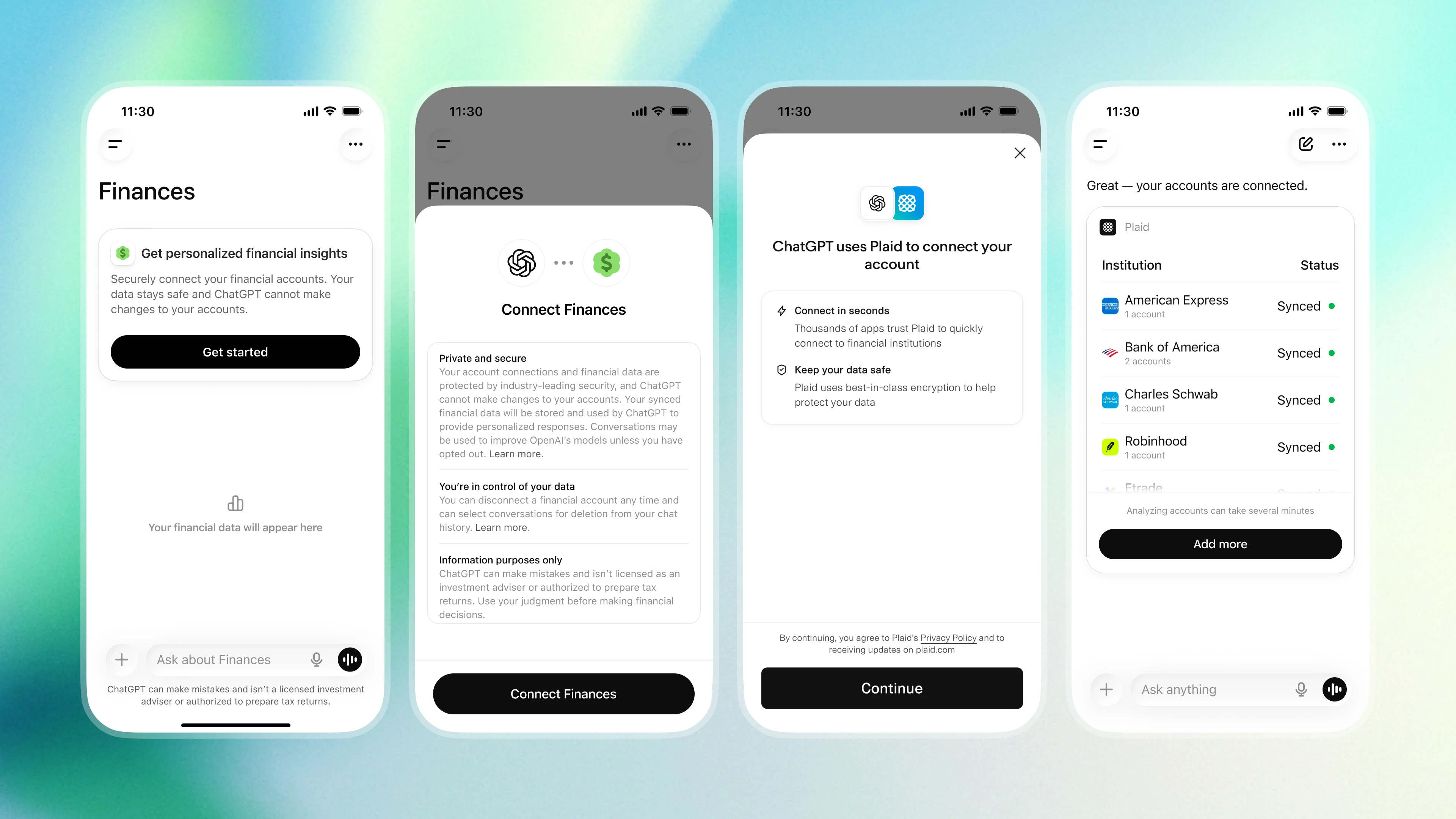
Getting started takes about two minutes. Open the Finances tab in ChatGPT's sidebar and click "Get started," or type @Finances, connect my accounts from anywhere in the chat interface — both paths drop you into the same Plaid authentication flow.
Once you authenticate, ChatGPT begins syncing and categorizing your transaction history. According to TechCrunch's reporting, the sync takes a few minutes, after which you're presented with a live dashboard covering portfolio performance, spending trends, recurring subscriptions, and upcoming bill payments.
Intuit support is coming soon, which expands the tool into tax territory — think: real-time analysis of what selling a stock position does to your tax bill, or your realistic odds of getting approved for a new credit card.
What ChatGPT Can Actually See in Your Financial Accounts
This is where the privacy question gets real. ChatGPT can read your account balances, transaction history, investment holdings, and outstanding liabilities — but it cannot see full account numbers and cannot execute any transaction on your behalf. It's read-only.
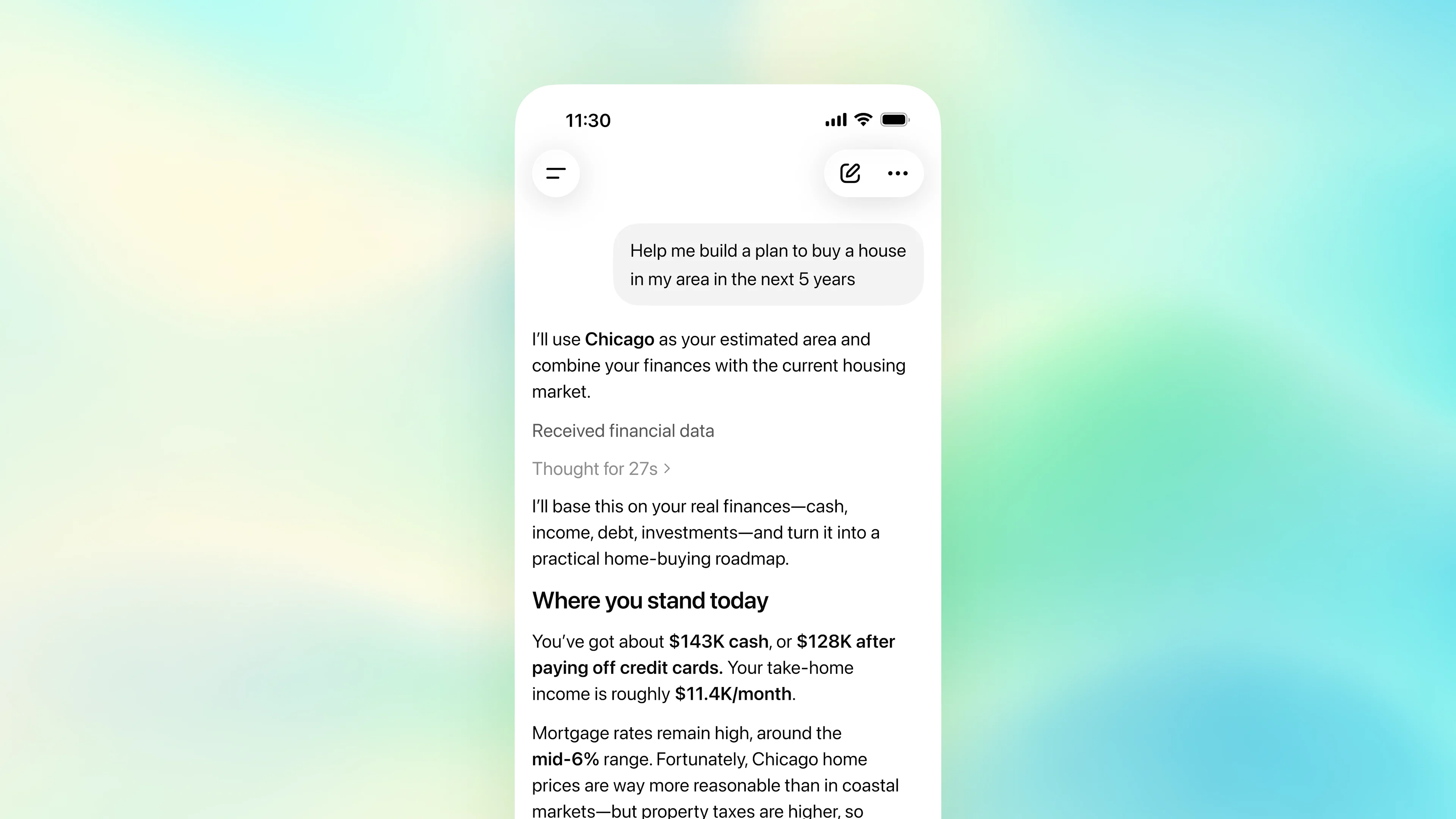
Beyond raw account data, you can add manual context: mortgage balances, informal loans, savings goals, or upcoming large purchases. ChatGPT saves these as "Financial memories" and uses them to make its advice specific rather than generic. That cross-context memory is the feature that separates this from a standard budgeting app — ChatGPT's persistent memory layer was already doing this for personal life context; finance is just the next domain.
Here's how it stacks up against dedicated tools you might already use:
| Feature | ChatGPT Finances | Rocket Money | Monarch Money |
|---|---|---|---|
| Account connections | 12,000+ via Plaid | ~11,000 | ~11,000 |
| Natural language queries | ✅ Full GPT-5.5 reasoning | ❌ Limited | ❌ Limited |
| Cross-context memory | ✅ Life goals + finances | ❌ Finance only | ❌ Finance only |
| Tax integration | Coming (Intuit) | ❌ | ❌ |
| Monthly cost | $100 (Pro plan) | $6–$12 | $14.99 |
| Execute transactions | ❌ Read-only | ✅ (bill cancellation) | ❌ |
GPT-5.5 and Financial Reasoning: Why This Model Upgrade Matters
The finance feature runs on GPT-5.5 — and that distinction isn't just a marketing footnote. Personal finance questions are rarely isolated; they're chains of context. "Should I refinance?" depends on your income, your current rate, how long you're staying in the house, and your current savings runway. Older models flatten that complexity. GPT-5.5 is specifically better at holding all of it at once.
According to OpenAI's announcement, the company worked with finance experts to build a dedicated benchmark for personal finance reasoning — meaning GPT-5.5 wasn't just fine-tuned on financial text, it was measured against real-world money questions and improved accordingly. That's a meaningful difference from bolting a generic LLM onto a budgeting API.
The practical output: ChatGPT can tell you not just that you overspent on dining in March, but that you consistently overspend the week after paydays — and connect that pattern to a specific behavioral loop. That's the kind of insight that takes a human advisor several sessions to surface. For a look at how GPT-5.5 compares to earlier models, we've covered the full breakdown.
ChatGPT Finance Privacy: What OpenAI Does With Your Banking Data
Handing an AI company your bank credentials is an uncomfortable trust fall. OpenAI has built specific guardrails to address that. ChatGPT cannot see full account numbers. It cannot initiate transfers or make any change to your accounts. The access is explicitly read-only through Plaid's authenticated layer, which doesn't pass raw credentials to OpenAI at all.
On the memory side: financial context stays out of temporary chats. You can view, edit, or delete individual financial memories directly from the Finances section. According to Engadget's coverage, disconnecting an account triggers a 30-day countdown, after which all synced data is removed. Your existing model training settings also apply — if you've already opted out of training data use, that carries over to the finance feature.
The real privacy question isn't "can OpenAI see my transactions?" — it's "what does this company do with the behavioral patterns it infers over months of use?" That answer isn't fully in the documentation yet. It's the kind of question worth watching as this feature exits preview. You can also review the broader dynamics of AI companies and personal data practices in our coverage of the space.
Frequently Asked Questions
Enjoy this article? Follow us on Google to see more content like this.
 Add as a preferred source on Google
- Get link
- X
- Other Apps
- Get link
- X
- Other Apps
Comments
Post a Comment